

Facebook Messenger doesn’t explicitly tell you if you’ve been blocked by someone. In fact, you can still search for the contact that has blocked you in the app and send them messages – they simply won’t receive them. Instead, you’ll need to do a little bit of detective work to find out if the person in question has decided they’ve had enough contact with you.
Here are the steps you need to take to tell whether you’ve been blocked on Facebook Messenger.
How to check whether you’ve been blocked on Messenger
As we said above, there is no warning or other indicator that states you’ve been blocked, but there are tell-tale signs which can confirm your suspicions.
To find out, open Facebook Messenger and search for the person you think has blocked you. At first, everything will seem normal, with their account appearing in the search results or generally in your list of contacts within the app.
The way to know is by simply trying to send them a message. Compose your message as you would normally, then tap the Send button.
In our case, the message showed as Sent (it has a circle next to it with a tick inside), but just stayed in that state permanently.
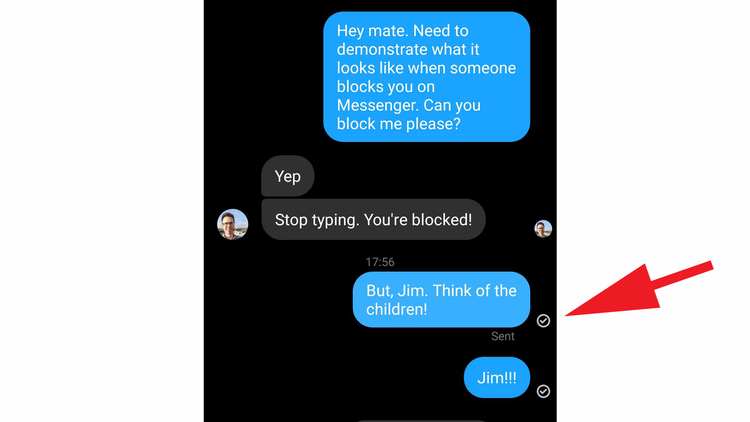
Normally, once the person has received the message, you’ll see the circle go from empty to filled-in with colour (as illustrated below).

Then, when they actually open the message on their device, you should see the circle disappear and change to their profile picture.
We think this ‘non-receiving’ approach must be so that the person can deny blocking the other party, if they should speak to them via another format, thus saving any embarrassment or confrontation.
Other signs you’ve been blocked on Facebook
While there’s no infallible way to confirm if you’ve been blocked, there are various other signs that you can look out for.
- Their profile picture has disappeared and you see a default one instead.
- You can’t start an audio or video call with the person.
- Their online/active status isn’t visible to you.
- You can’t add them to a group chat or tag them in a photo.
- You receive a ‘Message Not Sent’ warning or ‘This person isn’t receiving messages at this time’.
- If the person’s account doesn’t appear at all when you search for them, however, this could indicate that their account has been deactivated or deleted.
There’s no way to appeal being blocked or anything like that, as it remains entirely at the discretion of the account holder to decide who can access their content. The only way to get back in someone’s good graces is to try and contact them via a friend or another platform, just in case the reason for being blocked was accidental or a misunderstanding.
If someone has blocked you, relax and try not to worry about it. If they’ve blocked you, who needs them, right?
If you’re having difficulties with people on your social media, you can read how to block someone on Twitter, how to block people on Facebook and how to block people on Instagram too.
Author: Martyn Casserly, Contributor, Tech Advisor

Martyn has been involved with tech ever since the arrival of his ZX Spectrum back in the early 80s. He covers iOS, Android, Windows and macOS, writing tutorials, buying guides and reviews.