
Google unveiled its newest Pixel 9 series of flagships last year and one key aspect of these new products was the integration of its Gemini AI software.
Not only is Gemini a cornerstone of the phones, but the AI model has even made its way into the realms of earbuds too, with the new Google Pixel Buds Pro 2.
Since then, Gemini has managed to establish itself in the AI market, gradually receiving further updates, and it looks like Google won’t be resting on its laurels where new developments are concerned.
So, what exactly is Google Gemini and how can it be useful to you?
What is Google Gemini used for?
Gemini is Google’s AI software agent, there to help with questions, tasks and now, thanks to Gemini Live, engage in general conversation.
It was first introduced back in December 2023 by Google CEO Sundar Pichai and is available through the Gemini webpage in a similar fashion to Microsoft’s Copilot, ChatGPT, DeepSeek and a whole host of other new AI services.
You can ask Gemini to explain concepts in simple terms, answer factual questions, create images via text prompts, suggest meal plans, write things for you, research a subject, and various other information-based tasks.
But it’s the integration into Android phones and Android tablets, especially into Google’s own Pixel 9, Pixel 9 Pro, Pixel 9 Pro XL and Pixel 9 Pro Fold flagship phones that can make it so useful. For instance, Gemini integrates directly into other Google apps like Gmail, Maps, Calendar, Keep and YouTube via the new extensions.
These allow you to ask Gemini a question about something mentioned in an email – and Gemini will find the information and tell you the answer. Or, if someone has emailed you a recipe, Gemini is able to analyse it and create a shopping list of required ingredients and place it in Google Keep.
There’s also the ability to ask Gemini questions about a video you’re watching on YouTube. You can even take a photo of an upcoming event and ask Gemini to check your calendar to see if you’re free on that date.
Google has a list of the service’s other capabilities on the Gemini webpage.
What is Gemini Live?
One of the standout features of Google’s AI model is the new Gemini Live. This is a conversational assistant that you can talk to when planning days out or events, or ask for guidance and advice on a new area, for example.
It’s a voice interface that understands normal speech patterns, so you talk to it as you would a human. If you make a mistake or want to change tack, it’s okay. Gemini can cope with interruptions and use the context of the conversation to give relevant answers.
As Gemini is a voice-first interface, it’s also now incorporated into the new Pixel Watch 3 and Pixel Buds Pro 2, so you can interact with the AI without needing to get your phone out of your pocket.
Is Google Gemini a replacement for Assistant?
Gemini is now the default assistant on Google Pixel phones and is also available on most of the newer Android phones and Android tablets.
However, for older devices, the more familiar Google Assistant is still the default. It can set timers, control smart home devices, send messages and make calls, among other skills.
Is Google Gemini available now?
As of February 2025, Google’s Gemini 2.0 AI is now available to everyone and you can access it in various ways. The Gemini web portal is a great option to explore what you can do with the service.
There’s also the Gemini app, which is supported on Android devices running Android 10 or later and with 2GB or more of RAM.
For more in-depth instructions, follow our guide on how to install Google Gemini on your phone.
Foundry | Alex Walker-Todd
Gemini is now being baked into Android 14 and Android 15 as the default voice assistant, but for most devices (as well as the app), this version will use Google’s online servers to process commands and deliver results.
The Pixel 8, Pixel 8 Pro and Pixel 8a can use Gemini Nano – the on-device version of the AI – to deal with local tasks, and the same is true of the new Pixel 9 series.
Other high-end Android phones will also be able to access this version of the service. Currently, only the latest Samsung Galaxy phones, such as last year’s Galaxy S24, Galaxy S24+, Galaxy S24 Ultra, as well as the latest Galaxy S25, Galaxy S25+ and Galaxy25 Ultra, have access.
You can learn more about it on the Gemini Nano webpage.
Is Google Gemini AI free?
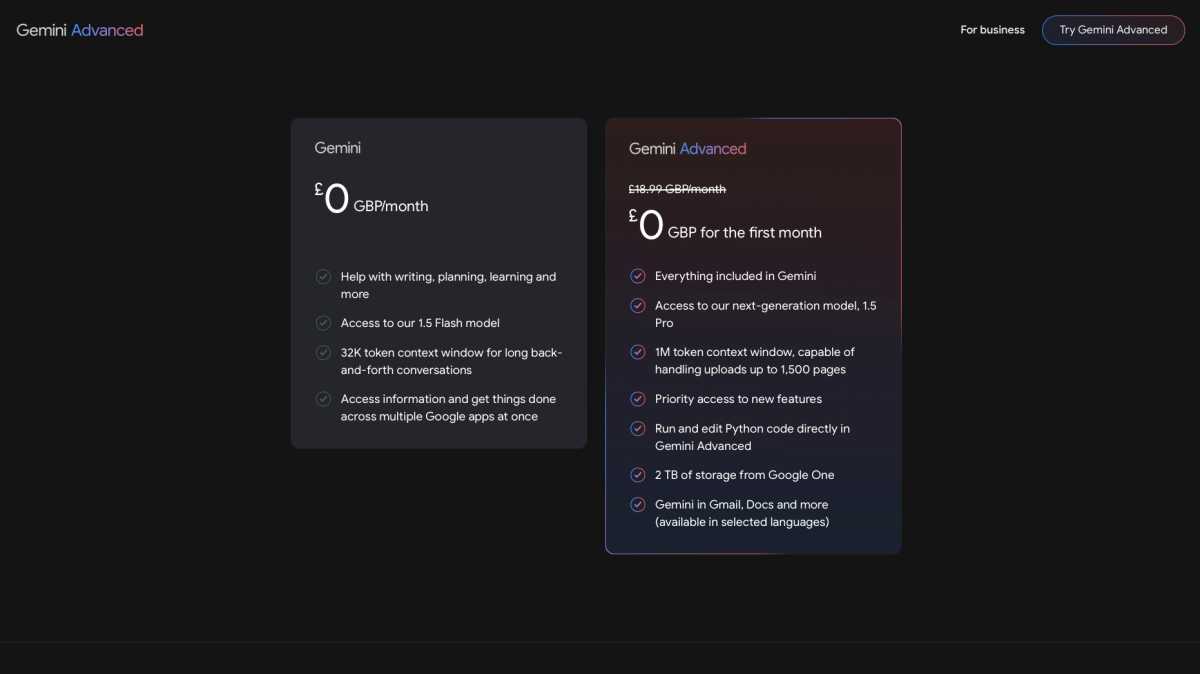
Some of the features covered above are free to use, such as asking questions and other information-gathering tasks.
However, for the more advanced features such as Gemini integration into Google Docs, Gmail and other apps, plus the upcoming Gemini Live, you’ll need to sign up to Gemini Advanced, which is on the Google One AI Premium tier. This will set you back £18.99/$20 per month.
There are other benefits though, as the plan also includes 2TB of Google Drive storage, a FitBit Premium subscription, 10% store credit when you make a purchase from the Google Store and other bonuses.
Will older Pixel devices get Google Gemini?
The hardware requirements for the on-device Gemini Nano mean that it will only work on the newer Pixel devices and selected Android devices from other brands – which boils down to the Pixel 8 series and the Pixel 9 lineup, as well as the Galaxy S24 series and the Galaxy S25 range.
Earlier Pixel models and Android devices from other brands will still be able to use the Gemini app, which works through Google’s online servers.
For more on what Google has recently announced, check out 5 new features on the Pixel 9 that we can’t wait to try.